MacBook Pro vs. iPad Pro – the debate is a defining one in the modern professional’s toolkit. For years, the laptop was the undisputed king of getting things done, while the tablet was a companion for consumption and light tasks. Today, the lines have blurred spectacularly. The iPad Pro, especially when paired with the Magic Keyboard and Apple Pencil, presents itself as a legitimate laptop replacement. Meanwhile, the MacBook Pro, now powered by Apple’s revolutionary M-series chips, is more powerful and efficient than ever. So, when it comes down to choosing your primary machine, your real workhorse, which one deserves the crown? This in-depth analysis will dissect their capabilities across key professional domains to help you decide.
The Core Philosophies: Computer vs. Computer-in-a-Tablet
Understanding the fundamental difference is crucial. The MacBook Pro vs. iPad Pro contest is, at its heart, a clash of operating systems and interaction paradigms. macOS is a desktop-class OS built for multitasking, file management, and professional-grade applications with deep, complex feature sets. It assumes you’ll use a pointer (trackpad/mouse) and keyboard as your primary inputs.
The iPad Pro runs iPadOS, a touch-first, mobile-derived operating system that has been progressively gaining “pro” features. Its philosophy centers on simplicity, direct manipulation, and app-centric workflows. While it now supports trackpads and mice, its soul is in the touchscreen and Apple Pencil. This core distinction influences every aspect of your workflow.
Raw Power and Performance: A Surprisingly Close Race
On paper, both devices are astonishingly powerful. The latest MacBook Pro with M3 Pro or M3 Max chips is a computational beast, designed to handle 3D rendering, 8K video editing, and scientific computing with ease. It benefits from active cooling, allowing it to sustain peak performance for extended periods.
The iPad Pro, equipped with the M2 or M4 chip, showcases silicon efficiency. In burst tasks and many optimized apps, it performs shockingly close to its laptop sibling. However, due to its fanless design, it can throttle under sustained, heavy loads. For most everyday professional tasks—including 4K video editing in DaVinci Resolve or LumaFusion, complex graphic design in Affinity Designer, or manipulating large data sets—both are overwhelmingly capable. The MacBook Pro vs. iPad Pro performance gap matters most at the extreme professional tier.
| Feature | MacBook Pro | iPad Pro |
|---|---|---|
| Chip (Current Gen) | M3 Pro / M3 Max | M4 |
| Cooling | Active (Fans) | Passive (Fanless) |
| Sustained Workloads | Excellent (e.g., long renders, compiles) | Good, can throttle on extreme tasks |
| Memory (RAM) | 18GB – 128GB | 8GB – 16GB |
| Storage Options | 512GB – 8TB SSD | 256GB – 2TB SSD |
Software and Workflow: The Ultimate Deciding Factor
This is where the MacBook Pro vs. iPad Pro debate is truly settled. Software defines what you can do and how efficiently you can do it.
MacBook Pro: The Depth of Desktop Applications
macOS offers the full, unabridged versions of industry-standard software. Final Cut Pro, Logic Pro, Xcode, Adobe Creative Suite (Photoshop, Illustrator, Premiere Pro), Cinema 4D, MATLAB, and advanced development environments run natively. You have true, window-based multitasking, a comprehensive file system accessible by any app, and the ability to run virtual machines if needed. It’s an environment built for managing complex projects with hundreds of files, intricate software pipelines, and deep customization.
iPad Pro: The Elegance of Focused Apps
iPadOS excels in streamlined, touch-optimized applications. Apps like Procreate, Lumafusion, and the Affinity suite are marvels of intuitive design and can often feel more direct and creative than their desktop counterparts. However, even “Pro” iPad apps are often simplified versions. Multitasking, while improved with Stage Manager, is still more constrained than on a Mac. File management, though functional, lacks the same flexibility. The workflow is often app-centric rather than project-centric.
Form Factor and Input: How Do You Interact?
The physical experience is vastly different. The MacBook Pro is a cohesive, clamshell device. Its best-in-class trackpad and keyboard are always there, perfect for hours of typing or precise cursor control. It works on your lap, at a desk, or in a coffee shop with equal stability.
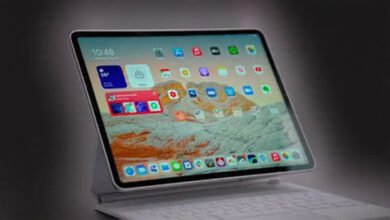
The iPad Pro is a shape-shifter. It’s a stunning tablet for reading, annotating, and drawing with the sublime Apple Pencil. With the Magic Keyboard attached, it becomes a competent laptop-like device, though the typing experience and trackpad are good but not quite MacBook-level. The magic is in its versatility: detach it to present to a client, draw directly on the screen, or use it as a portable second monitor for your Mac via Sidecar. In the MacBook Pro vs. iPad Pro ergonomics battle, the iPad wins on flexibility, the MacBook on dedicated precision.
Professional Use Case Breakdown
Let’s apply this to real-world roles. The choice in the MacBook Pro vs. iPad Pro dilemma heavily depends on your specific profession.
| Profession | Recommended Workhorse | Key Reasoning |
|---|---|---|
| Software Developer | MacBook Pro | Needs full IDEs (Xcode, VS Code), terminal access, virtualization, and multiple displays. iPad development is possible but severely limited. |
| Video Editor (Pro) | MacBook Pro | Requires full Final Cut Pro / Premiere Pro, multi-track timelines, complex effects, and sustained export performance. |
| Graphic Designer / Illustrator | iPad Pro as a companion, MacBook Pro as primary. | The iPad Pro with Pencil is unbeatable for sketching, illustration, and client presentations. But final asset creation, typography, and multi-app workflows often need macOS. |
| Writer / Journalist / Student | iPad Pro (with Keyboard) | Perfect for research, note-taking with Pencil, and writing. The portability and all-in-one form factor are ideal for mobility-focused work. |
| Business Professional | Depends on tasks. Email/meetings: iPad Pro. Data Analysis/Reports: MacBook Pro. | For communication, light spreadsheet work, and presentations, the iPad suffices. For heavy financial modeling, complex presentations, and extensive multitasking, the MacBook is superior. |
Connectivity and Expandability
The MacBook Pro typically offers more ports (HDMI, SD card, multiple Thunderbolt) without requiring dongles for common peripherals. It supports multiple external displays natively. The iPad Pro is limited to the USB-C port (though very fast) and has more restrictive external display support, often mirroring or extending in a limited way. If your workstation involves multiple monitors, external GPUs (though less relevant with Apple Silicon), or various peripherals, the MacBook Pro is the clear winner in the MacBook Pro vs. iPad Pro connectivity contest.
Price Consideration: The True Cost of a Workhorse
Direct price comparison is tricky. A fully-specced 13-inch MacBook Pro might start at a similar point to an 11-inch iPad Pro. However, to make the iPad Pro a true laptop contender, you must add the Magic Keyboard and Apple Pencil—a significant premium. Suddenly, the price gap narrows considerably, and a mid-tier iPad Pro configuration with accessories can cost as much as or more than a base MacBook Air, blurring the value proposition. You must ask what you’re getting for that investment.
Verdict: Which is Your Real Workhorse?
The answer to the MacBook Pro vs. iPad Pro question is not universal. It’s deeply personal and professional.
Choose the MacBook Pro if: Your work is defined by complex, multi-window software; deep file system manipulation; coding; professional-grade video/audio production; or any task that requires the unabridged, desktop version of applications. It is the undisputed workhorse for traditional, intensive computing tasks. It’s a powerhouse that says, “Get serious work done.”
Choose the iPad Pro if: Your work is mobile-first, touch-centric, and benefits immensely from direct screen interaction. It’s for the artist sketching concepts, the journalist on the move, the doctor making rounds, or the student consolidating notes and textbooks into one device. It shines when your workflow is app-based and your priority is portability and versatility above all else.
For many, the ideal answer isn’t a choice between MacBook Pro vs. iPad Pro, but a combination of both. Using the MacBook Pro as the primary engine for heavy lifting and the iPad Pro as a sublime satellite device for capture, consumption, and specific creative tasks—connected via Continuity—is arguably Apple’s most powerful professional ecosystem.
Ultimately, the MacBook Pro remains the safer, more capable bet as a sole workhorse for the vast majority of knowledge workers. The iPad Pro is a brilliant, revolutionary device that can be a workhorse for a specific subset of users, but for most, it’s a phenomenal companion rather than a complete replacement. Your real workhorse is the one that disappears, allowing you to focus solely on your work. For most, that’s still the MacBook Pro.
Frequently Asked Questions
- Can the iPad Pro truly replace a MacBook Pro? For a minority of users with specific, app-focused workflows (e.g., illustration, light video editing, writing), yes. For most professionals requiring desktop-grade software, advanced multitasking, and flexible file management, it cannot fully replace a MacBook.
- Is the iPad Pro more powerful than the MacBook Pro? In terms of raw silicon efficiency (like single-core performance), the latest iPad Pro chips are incredibly close. However, due to thermal constraints (no fans) and software limitations, the MacBook Pro will almost always deliver higher sustained performance in professional applications.
- Which is better for students? For most students, an iPad Pro (or even iPad Air) with a keyboard and Pencil is an excellent all-in-one device for note-taking, reading, research, and writing papers. Students in engineering, computer science, or media production will likely still need a MacBook.
- Can I code on an iPad Pro? While possible with apps like Swift Playgrounds, Pythonista, or using cloud-based IDEs, it is severely limited compared to a MacBook Pro. Professional development almost universally requires a Mac.
- Is the MacBook Pro still worth it if I have an iPad? Absolutely. They serve different roles. Many professionals use the iPad for capture, ideation, and mobile tasks, and the MacBook for deep work, production, and complex project assembly. Together, they form a powerful duo.