Finding the best phones for productivity is no longer a luxury; it’s a necessity for professionals, entrepreneurs, and students alike. In the fast-paced American market, a smartphone is your mobile command center, handling everything from email triage and document editing to video conferencing and project management. But with a dizzying array of options, how do you choose the device that will genuinely enhance your workflow rather than hinder it? This comprehensive guide cuts through the noise, evaluating the top contenders based on performance, ecosystem integration, multitasking capabilities, and unique productivity features to crown the ultimate tools for getting things done.
What Defines a Productivity Powerhouse?
Before diving into specific models, it’s crucial to understand the criteria that separate a casual smartphone from a productivity dynamo. The best phones for productivity excel in several key areas:
- Raw Performance & Multitasking: A powerful processor (like the latest Snapdragon 8 series or Apple’s A-series Bionic chips) and ample RAM (12GB or more is ideal) ensure smooth app switching, lag-free performance with demanding tools, and the ability to run multiple apps in split-screen or floating windows.
- Display Quality & Size: A large, bright, high-resolution screen (preferably OLED/AMOLED) reduces eye strain and makes reading documents, editing spreadsheets, and reviewing designs a pleasure. High refresh rates (90Hz or 120Hz) contribute to a fluid, responsive feel.
- Battery Life & Charging: A phone that dies at 3 PM is a productivity killer. All-day battery life is non-negotiable, and support for fast wired and wireless charging provides quick top-ups between meetings.
- Software & Ecosystem: A clean, intuitive operating system with robust productivity features (e.g., Samsung DeX, Google’s seamless cloud integration) and deep ties to a broader ecosystem (laptop, tablet, cloud storage) creates a seamless workflow.
- Accessory Support: Compatibility with a stylus (like the S Pen or Apple Pencil) for note-taking and sketching, as well as reliable keyboard cases, can transform a phone into a compact workstation.
The Top Contenders: A Side-by-Side Comparison
Here is a detailed comparison of the leading best phones for productivity available in the US market, highlighting their core strengths for the working professional.
| Phone Model | Key Productivity Features | Ideal For | Considerations |
|---|---|---|---|
| Samsung Galaxy S24 Ultra | Integrated S Pen, Samsung DeX for desktop experience, exceptional multitasking with One UI, top-tier performance (Snapdragon 8 Gen 3), massive bright display. | Power users, note-takers, creatives, those who want a laptop replacement via DeX. | Large and heavy, premium price tag, One UI has a learning curve. |
| Apple iPhone 15 Pro Max | Seamless Apple ecosystem (Continuity, Handoff, Universal Clipboard), powerful A17 Pro chip, best-in-class video conferencing, robust app optimization. | Professionals entrenched in the Apple ecosystem, content creators, those prioritizing app stability and video calls. | Limited multitasking flexibility vs. Android, no native desktop mode, expensive. |
| Google Pixel 8 Pro | Clean Android with longest update promise, superior AI features (Call Screen, Assistant, photo editing), excellent Google Workspace integration, Magic Compose for messages/emails. | Google Workspace power users, those who value AI assistance, fans of stock Android. | Moderate multitasking features, Tensor chip not the absolute performance king. |
| Samsung Galaxy Z Fold 5 | Transformative large interior display for true tablet-like multitasking, App Continuity, S Pen support (Fold Edition), Flex Mode for hands-free video calls. | Early adopters, multitasking masters, professionals who need maximum screen real estate in a pocketable form. | Extremely expensive, fragile inner display, heavier than traditional slabs. |
| OnePlus 12 | Blazing fast charging (80W in US), high-performance Snapdragon 8 Gen 3, clean OxygenOS, large vibrant display, excellent value proposition. | Professionals who need quick power top-ups, performance seekers on a relative budget. | Weaker ecosystem than Samsung/Apple, camera system is good but not class-leading. |
Deep Dive: Analyzing the Best Phones for Productivity
Samsung Galaxy S24 Ultra: The All-Round Powerhouse
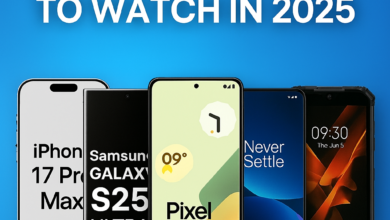
The Samsung Galaxy S24 Ultra stands as arguably the most feature-complete productivity device on the market. Its crown jewel is the integrated S Pen, which turns the phone into a digital notepad, perfect for jotting down ideas, signing documents, or precise photo editing. Coupled with Samsung’s incredibly powerful DeX mode—which allows you to connect the phone to a monitor for a desktop-like experience—the S24 Ultra blurs the line between phone and computer. Its Snapdragon 8 Gen 3 chip and up to 12GB of RAM handle any workload with ease, while the large, flat, ultra-bright display is ideal for reviewing work. For the user who wants one device to rule them all, this is a top contender for the title of best phones for productivity.
Apple iPhone 15 Pro Max: The Ecosystem Champion
For those living firmly within Apple’s walled garden, the iPhone 15 Pro Max is an unmatched productivity tool. Its strength isn’t in a single killer feature, but in the magical synergy between devices. Start an email on your iPhone, finish it on your Mac. Copy text on your iPad, paste it on your iPhone. Take a call on your Mac using your iPhone’s connection. This level of integration, powered by the formidable A17 Pro chip and iOS’s stability, creates a frictionless workflow that is hard to leave. The exceptional camera system, particularly for video, also makes it the go-to for content creators and professionals who communicate via high-quality visual media.
Google Pixel 8 Pro: The AI-Powered Assistant
The Google Pixel 8 Pro takes a software-first approach to productivity, leveraging Google’s industry-leading AI. Features like Call Screen handle spam seamlessly, while Magic Compose can help draft professional emails and messages in your style. Its deep, native integration with Google Workspace (Docs, Sheets, Meet, Drive) is second to none. The promise of seven years of OS updates ensures your device remains secure and modern far longer than most Android rivals. If your workflow is cloud-native and lives in Google’s ecosystem, and you value intelligent software aids, the Pixel 8 Pro is a compelling choice among the best phones for productivity.
Samsung Galaxy Z Fold 5: The Multitasking Marvel
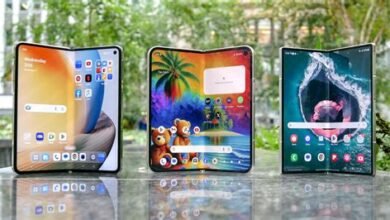
The Galaxy Z Fold 5 is in a category of its own. When unfolded, its tablet-sized interior display revolutionizes mobile work. You can comfortably view three apps simultaneously, work on a detailed spreadsheet with a full keyboard, or read lengthy PDFs without constant zooming. This makes it arguably the ultimate device for heavy multitaskers and mobile professionals. While the price is steep and the form factor requires care, the sheer productivity gain from the expansive screen is transformative for the right user.
Choosing Your Perfect Productivity Partner
Your ideal phone depends heavily on your existing workflow and preferences. Ask yourself these questions:
- What ecosystem are you in? If you use a Mac and iPad, an iPhone is logical. If you live in Google Drive and Chrome, a Pixel shines. If you need desktop flexibility, Samsung DeX is key.
- How do you input information? If you take handwritten notes, the S24 Ultra or Z Fold 5 with S Pen is essential. If you type everything, a good keyboard case might be your priority.
- What is your primary task? Are you constantly on video calls (prioritize camera and battery), editing documents on the go (prioritize large screen), or managing projects across dozens of apps (prioritize RAM and multitasking features)?
Ultimately, the best phones for productivity are those that fade into the background, becoming a seamless extension of your intent. They remove friction, save time, and empower you to accomplish more, regardless of your location.
Frequently Asked Questions
- Q: Is an iPhone or Android better for productivity?
A: It depends on your ecosystem and needs. iPhones offer unparalleled integration with other Apple devices. High-end Android phones, particularly from Samsung, offer more advanced multitasking, desktop modes, and stylus support. - Q: How much RAM do I need for productivity?
A> For serious multitasking (keeping many apps alive, using split-screen, DeX), 12GB is the sweet spot. 8GB is sufficient for moderate use, but 16GB is becoming more common on flagship devices for future-proofing. - Q: Can a phone really replace my laptop?
A> For many tasks (email, web browsing, document editing, video calls), yes—especially with desktop modes like Samsung DeX or using cloud services. For specialized software (advanced coding, video editing, CAD), a traditional computer is still necessary. - Q: Are foldable phones good for productivity?
A> The Samsung Galaxy Z Fold series is exceptional for productivity due to its large interior screen, enabling true tablet-like multitasking. However, they are expensive, more fragile, and heavier than traditional slab phones. - Q: What is the most important feature for a productivity phone?
A> Reliable, all-day battery life is foundational. A dead phone is a useless tool. After that, a combination of a large, high-quality display and robust performance for smooth multitasking is critical.