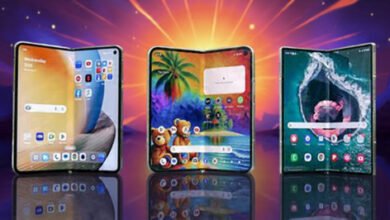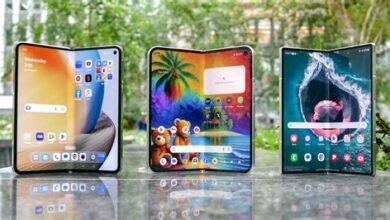
Foldable apps are no longer a novelty; they are the vanguard of a fundamental shift in how we interact with our personal technology. As we move into 2026, the hardware for foldable and dual-screen devices—from smartphones to tablets and laptops—has matured significantly. The true differentiator now lies in software. The best foldable apps are those that don’t merely stretch to fit a larger canvas but intelligently adapt, offering unique functionalities that leverage hinges, multiple postures, and the seamless transition between screen sizes. This article explores the essential foldable apps that define the 2026 experience, categorized by their core utility and innovative use of the form factor.
The Evolution of the Foldable Ecosystem
The journey from the first clamshell phones to today’s sophisticated foldables has been remarkable. Early adopters faced a stark reality: stunning hardware hampered by software that treated the expansive inner display as just a bigger phone screen. By 2026, this paradigm has completely shifted. Operating systems like Android (with robust support for Continuity, App Pairs, and Taskbar) and Windows (with native Snap Layouts and posture awareness) have built foundational support for flexible displays. This has empowered developers to create truly transformative foldable apps. The focus is now on continuity, context-aware layouts, and leveraging the dual-screen real estate for multitasking and immersive consumption in ways a traditional slab phone or single-screen tablet never could.
Productivity Powerhouses: Redefining Work on the Go
For professionals, foldable apps in 2026 have turned devices into pocketable command centers. The following table highlights the standout productivity applications.
| App Name | Core Function | Foldable-Specific Feature |
|---|---|---|
| Microsoft 365 (Adaptive Suite) | Document editing, spreadsheets, presentations | “Dual-Pane Editing” mode: View source material on one screen while editing on the other. “Posture-Sense Presenter View” in PowerPoint when device is partially folded. |
| Obsidian Canvas Pro | Note-taking and knowledge management | Infinite canvas that intelligently wraps around the hinge; use one screen for a mind map and the other for linked detailed notes. |
| Todoist Matrix | Task and project management | Drag-and-drop between “Today” (left screen) and “Upcoming/Projects” (right screen). Hinge acts as a visual separator for priority levels. |
| Adobe Fresco & Illustrator | Digital art and design | Use the cover screen for tool palettes and color pickers while the main canvas occupies the full inner display. Supports pressure-sensitive input across the fold. |
Maximizing Multitasking with App Continuity
A key advantage of modern foldable apps is seamless app continuity. Imagine starting an email on your cover screen, unfolding your device, and having the app instantly transform into a rich composition window with your inbox visible on a second pane. This fluid transition, powered by sophisticated state preservation and layout switching, is now standard in top-tier apps like Gmail, Spark, and Outlook 2026. The device understands its posture and delivers the appropriate UI, making the physical act of folding and unfolding an integral part of the workflow.
Creativity and Content Consumption: Immersion Unfolded
For creators and consumers alike, foldables offer a uniquely engaging canvas. Video editing apps like LumaFusion 2026 utilize the extra space for a full editing timeline on the bottom screen while the preview plays on top, mimicking a desktop setup. Photography apps, such as Adobe Lightroom, use the dual screens to show the original image on one and the edited version with sliders on the other for real-time comparison.
Media consumption is where the hardware truly shines, and apps have risen to the occasion. Streaming services like Netflix, Disney+, and YouTube have developed dedicated “Cinematic Mode” layouts for when the device is partially folded in a tent or stand posture, optimizing the video placement and moving controls to the unused screen portion. E-book and comic readers, such as Kindle and Chunky, now offer a breathtaking two-page spread view when unfolded, creating a digital experience that closely mimics reading a physical book or graphic novel.
Gaming and Entertainment: A New Playground
The gaming sector has embraced foldables with ingenious adaptations. Games like “Pascal’s Wager: Definitive Edition” use the full inner display for breathtaking gameplay but shift maps, inventory, and communication menus to the cover screen when closed, allowing for asynchronous play. Racing and simulation games utilize the hinge as a natural steering wheel or control panel divider. Emulator apps have become particularly popular, using one screen for the classic game display (like a DS or 3DS) and the other for virtual touch controls or performance metrics, all thanks to advanced foldable apps optimization.
| App/Game Category | Example | Innovative Use of Foldable |
|---|---|---|
| Enhanced Emulation | Lemuroid Pro | Native dual-screen support for Nintendo DS/3DS titles; customizable button mapping per screen. |
| Strategy & Simulation | Civilization VII: Pocket Edition | Main map on left screen, city management and unit details on the right. Pinch-to-zoom across the hinge seamlessly. |
| Interactive Streaming | Xbox Cloud Gaming / GeForce NOW | Game stream on primary display, with chat, walkthroughs, or performance stats on the secondary. |
Utility and Lifestyle: The Smart Daily Drivers
Beyond work and play, everyday utility foldable apps make the device indispensable. Mapping apps like Google Maps and Waze show turn-by-turn directions on the cover screen while unfolded, they present a full interactive map with points of interest. Travel apps like Google Translate can act as a real-time interpreter, showing the original language on one screen and the translation on the other during a conversation. Financial apps like Monarch Money can display your budget overview on one side and detailed transaction history on the other, making money management a breeze.
The Role of AI in Adaptive Interfaces
By 2026, artificial intelligence is deeply integrated into the foldable experience. AI doesn’t just suggest which two apps to pair; it learns your daily routines and automatically suggests optimal app pairs and layouts based on time, location, and activity. An AI-powered window manager can dynamically resize and reposition app panes based on your focus, ensuring the most relevant information is always at the forefront, whether you’re folded or unfolded. This intelligent layer makes using foldable apps feel intuitive and personalized.
Looking Ahead: The Future of Foldable Apps
The trajectory for foldable apps points towards even deeper integration with device sensors and cloud services. We can anticipate apps that change their functionality based on the angle of the fold, or that use the outer display for glanceable, contextual widgets that become full apps upon unfolding. Cross-device continuity will also improve, allowing a task started on a foldable phone to be seamlessly picked up on a foldable laptop or tablet. The development frameworks have matured, lowering the barrier for developers to build adaptive apps from the ground up, ensuring that the 2026 app landscape is rich with optimized experiences.
Frequently Asked Questions
- Are most major apps optimized for foldables in 2026?
Yes, the vast majority of top-tier apps across productivity, creativity, and entertainment categories now offer optimized experiences for foldable devices, with adaptive layouts and dual-screen features. - Do I need a specific brand of foldable phone to use these apps?
No. While some manufacturers may have slight proprietary enhancements, the core optimizations are built into the latest versions of Android and Windows, making these foldable apps experiences widely available across brands. - Is battery life a concern when using multiple app panes?
Modern foldables in 2026 have significantly improved power efficiency. While running two intensive apps simultaneously will consume more power than a single app, optimized software and larger batteries generally provide all-day usage. - Can I force older, non-optimized apps to work well on a foldable?
Yes. The operating system includes compatibility modes that can either letterbox the app, span it across the screen (which may look stretched), or allow you to manually set a preferred aspect ratio for each app. - What is the single biggest advantage of using foldable-optimized apps?
The elimination of context switching. Having two fully functional app panes visible and interactive side-by-side dramatically enhances multitasking efficiency and creates a more immersive, continuous workflow.